
your privacy & wikipedia.org

The world’s most private search engine?

Because it’s our belief that personal data should be your data, not Big Data. Period.” – startpage.com

startpage.com

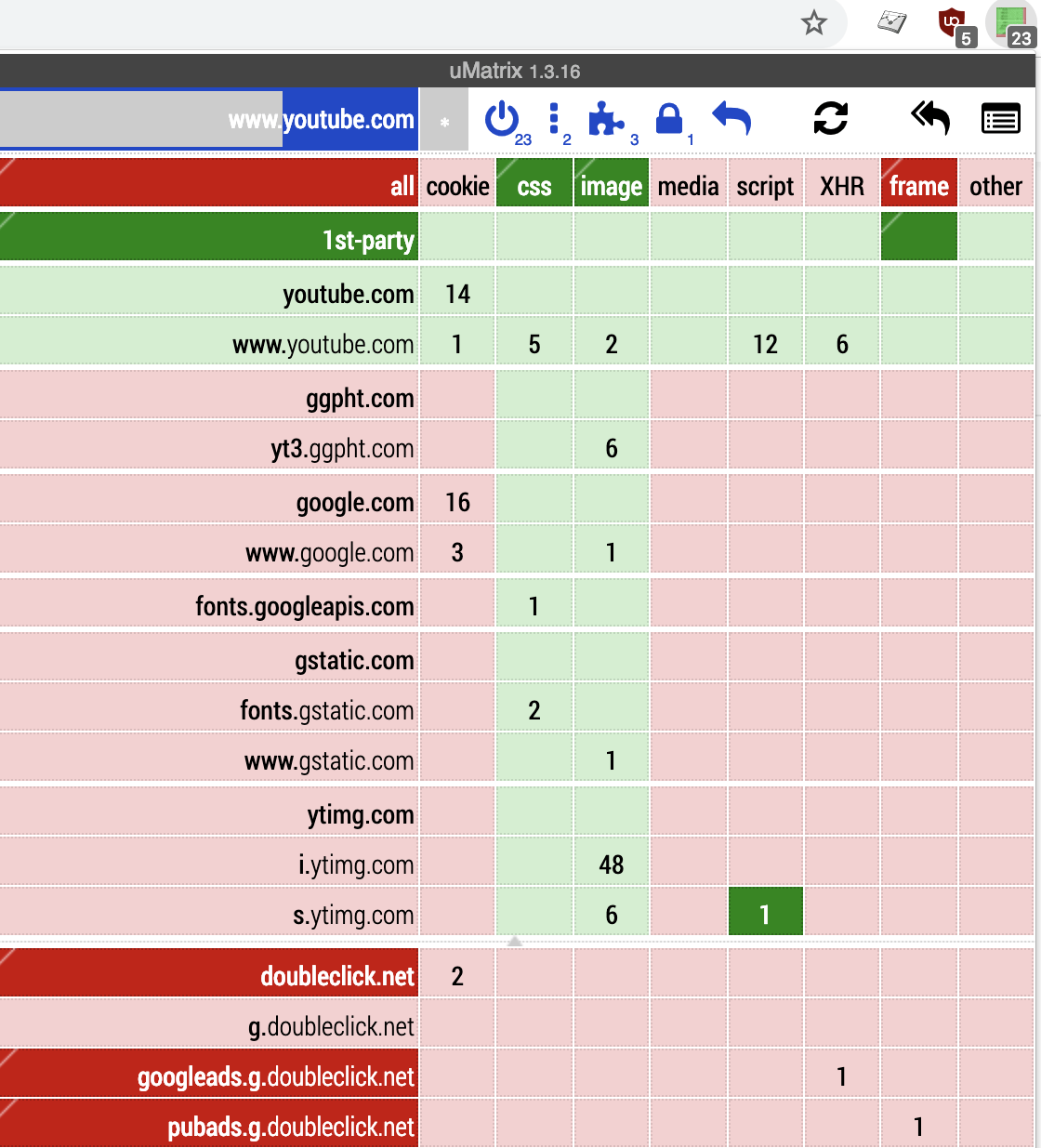
Visit https://en.wikipedia.org/wiki/Main_Page without Anonymous Startpage.com view on uMatrix 1.4.0 for Firefox, currently en.wikipedia.org interacts with your device with:
3 cookies, 1 from wikipedia.org and 2 from en.wikipedia.org so no third-party cookies.
3 Cascading Style Sheets (or CSS), a style sheet language used for describing the presentation of a document written in a markup language like HTML. Privacy infringement: it allowed websites to uncover a user’s browsing history and figure out what sites the user had visited. Combined with other Web technology such as JavaScript or simply loading of background images, lets Web pages determine whether a URL is in the user’s history very quickly and without any interaction from the user. This is mitigated by browsers.
26 images, an (leaky) image can reveal whether the user is visiting a specific website. None from third-party sources.
0 media, viewing videos on the Internet might collect Personal Information.
7 scripts, JavaScript tells all, which turns out not to be so great for privacy: Side-channel leaks can be exploited to follow you around the interweb. A JavaScript template Attacks will Automatically be Inferring Host Information for Targeted Exploits. JavaScript Template Attacks can be used for user fingerprinting. None from third-party sources.
8 XHR (or XMLHttpRequest) is a built-in browser object that allows to make HTTP requests in JavaScript. Despite of having the word “XML” in its name, it can operate on any data, not only in XML format. It uses user and password for login and password on basic HTTP auth. Using resources retrieved via XMLHttpRequest in your background page could fall victim to cross-site scripting. Guard yourself against malicious web pages that might try to impersonate a content script. In particular, do not allow content scripts to request an arbitrary URL. Use HTTPS whenever possible. None from third-party sources.
0 frames, beware of a Frame Injection. Cross-site Scripting is naturally prioritized since it seems easily exploitable and effective. Hackers also are attracted to this vulnerability, because there are aspects of the Frame Injection attack that can allow them to redirect users to other malicious websites used for phishing and similar attacks.

Visit https://en.wikipedia.org/wiki/Main_Page with Anonymous Startpage.com view on uMatrix 1.4.0 for Firefox, currently en.wikipedia.org interacts with your device with:
zero third party or wikipedia.org cookies, CSS, images, media, scripts, XHR or frames!
But: 74 items of startpage.com itself (see below)
7 cookies
14 Cascading Style Sheets (or CSS)
28 images
0 media
14 scripts
7 XHR
5 frames
Final remarks, stated in the privacy policy of Startpage.com. We don’t collect any “personal data”. We don’t record your IP address. We don’t serve any tracking or identifying cookies. We don’t record your search queries. We don’t disclose or sell your contact information. Regarding governmental requests; they can’t request what we don’t have. We will never comply with any voluntary surveillance program. Startpage.com complies with the GDPR.

Please visit my website https://internetcookies.food.blog/ regularly. Select your own internet cookies (and other privacy related) control Add-Ins. Enjoy the reading!


A New California Internet Privacy Law Returns Power to Consumers

A New California Internet Privacy Law Returns Power to Consumers

http://privacyblog.com/2019/12/28/a-new-california-internet-privacy-law-returns-power-to-consumers/
— Lees op privacyblog.com/2019/12/28/a-new-california-internet-privacy-law-returns-power-to-consumers/

What does companies store of your online profile for commercial purposes?

Photo by morais on Pexels.com

your privacy @ internetcookies.food.blog

According to uMatrix 1.4.0 for Firefox, currently internetcookies.food.blog interacts with your device with:
10 Cascading Style Sheets (or CSS), a style sheet language used for describing the presentation of a document written in a markup language like HTML. Privacy infringement: it allowed websites to uncover a user’s browsing history and figure out what sites the user had visited. Combined with other Web technology such as JavaScript or simply loading of background images, lets Web pages determine whether a URL is in the user’s history very quickly and without any interaction from the user. This is mitigated by browsers.
6 images, an (leaky) image can reveal whether the user is visiting a specific website.
0 media, viewing videos on the Internet might collect Personal Information.
8 scripts, JavaScript tells all, which turns out not to be so great for privacy: Side-channel leaks can be exploited to follow you around the interweb. A JavaScript template Attacks wil Automatically be Inferring Host Information for Targeted Exploits. JavaScript Template Attacks can be used for user fingerprinting.
0 XHR (or XMLHttpRequest) is a built-in browser object that allows to make HTTP requests in JavaScript. Despite of having the word “XML” in its name, it can operate on any data, not only in XML format. It uses user and password for login and pasword on basic HTTP auth. Using resources retrieved via XMLHttpRequest in your background page could fall victim to cross-site scripting. Guard yourself against malicious web pages that might try to impersonate a content script. In particular, do not allow content scripts to request an arbitrary URL. Use HTTPS whenever possible.
1 frame, beware of a Frame Injection. Cross-site Scripting is naturally prioritized since it seems easily exploitable and effective. Hackers also are attracted to this vulnerability, because there are aspects of the Frame Injection attack that can allow them to redirect users to other malicious websites used for phishing and similar attacks.

Please visit my website https://internetcookies.food.blog/ regularly. Select your own internet cookies (and other privacy related) control Add-Ins. Enjoy the reading!

uBlock Origin

An efficient adblocker. It uses low processor power and low memory.
How efficient is uBlock Origin: https://github.com/gorhill/uBlock/wiki/uBlock-vs.-ABP:-efficiency-compared
This tool gives you the opportunity to apply and load thousands of filters, more then every other competitive adblocker. Regarding internetcookies it uses hpHosts’s tracking servers. It’s open-source with public licence (GPLv3).
Even though Firefox blocks trackers by default, some users prefer ad-blockers. uBlock Origin is an efficient blocker that can load and enforce thousands of more filters than other popular blockers out there and uses limited memory. – Sabarinath @ techlog360.com
More information on https://en.wikipedia.org/wiki/UBlock

Noscript

Noscript: the best security you can have in your browser! Only allow active content on website you trust and protect yourself against XSS and Clickjacking attacks, Spectre, Meltdown and other JavaScript exploits.
FAQ: https://noscript.net/faq undefined
Forum: https://noscript.net/forum
“Giorgio Maone’s NoScript script-blocking plug-in is the one-and-only Firefox add-on I consider mandatory.” – CNET News
More information on https://en.wikipedia.org/wiki/NoScript

No-cookies at public broadcaster’s website

Thanks to the public broadcaster’s various quality programs we offer advertisers the exact coverage they are looking for. STER enhances each and every campaign with its insights, knowledge, quality and coverage. – Dutch Advertising company for the public broadcaster (STER).
No cookie profiles available at STER. In 2019 it experimented with context related to themes for Advertisements. As of 2020 there are 20 contexts for an advertiser to show its advertisements at STER. Advertiser still receive data like CTR, impressions, look out ratio’s and devices types. But no possibility to install cookies in advertisements. Why? Only 10% of the STER audience opted for personalized advertisements in a video. So in the Netherlands annually 40 up-to 50 million impressions of online video and 300+ million impressions with display: no-cookies. STER has an audience of 7,1 million video viewers and 5,8 million display advertisements in the Netherlands (17 million inhabitants).

uMatrix

uMatrix: point & click to forbid/allow any class of requests made by your browser. Use it to block scripts, iframes, ads, facebook, etc.
uMatrix Wiki: https://github.com/gorhill/uMatrix/wiki
If you’re able to withstand the learning curve of uMatrix you’ll be rewarded many times over with a faster, safer internet, and enhanced privacy. As time goes on, more and more services and apps are trying to track you and use your data for their benefit, so the best time to learn how to safeguard your internet browsing experience is now.Angelo Spampinato
More information on https://medium.com/@angelospmusic/umatrix-and-why-you-should-be-using-it-c747015717e4
uMatrix main page

How Internet Cookies Work

Some Cookie Basics from https://www.howstuffworks.com
Marshall Brain posted on the website his own definition on cookies:
A cookie is a piece of text that a Web server can store on a user’s hard disk. Cookies allow a Web site to store information on a user’s machine and later retrieve it. The pieces of information are stored as name-value pairs.
How Internet Cookies work is by saving pieces of information like UserID A9A3BECE0563982D http://www.goto.com/ when visiting the goto.com
Goto.com has stored on my machine a single name-value pair. The name of the pair is UserID, and the value is A9A3BECE0563982D. The first time I visited goto.com, the site assigned me a unique ID value and stored it on my machine.
More aloborative an Internet Cookie can contain more information by visiting a website, for instance Amazon.com stores a bit more information on my machine.
session-id-time 954242000 amazon.com/ session-id 002-4135256-7625846 amazon.com/ x-main eKQIfwnxuF7qtmX52x6VWAXh@Ih6Uo5H amazon.com/ ubid-main 077-9263437-9645324 amazon.com/
It appears that Amazon stores a main user ID, an ID for each session, and the time the session started on my machine (as well as an x-main value, which could be anything).
A Web site can only receive the data it has stored on your machine. It cannot look at any other cookie, nor anything else on your machine.
The data moves in the following manner:
* If you type the URL of a Web site into your browser, your browser sends a request to the Web site for the page. For example, if you type the URL http://www.amazon.com into your browser, your browser will contact Amazon’s server and request its home page.
* When the browser does this, it will look on your machine for a cookie file that Amazon has set. If it finds an Amazon cookie file, your browser will send all of the name-value pairs in the file to Amazon’s server along with the URL. If it finds no cookie file, it will send no cookie data.
* Amazon’s Web server receives the cookie data and the request for a page. If name-value pairs are received, Amazon can use them.
* If no name-value pairs are received, Amazon knows that you have not visited before. The server creates a new ID for you in Amazon’s database and then sends name-value pairs to your machine in the header for the Web page it sends. Your machine stores the name-value pairs on your hard disk.
* The Web server can change name-value pairs or add new pairs whenever you visit the site and request a page.
There are other pieces of information that the server can send with the name-value pair. One of these is an expiration date. Another is a path (so that the site can associate different cookie values with different parts of the site).
By adopting het Internet Cookie by websites, a database is filled with things you have selected from the site, pages you have viewed from the site, information you have given to the site in online forms, etc. containing your unique ID is all that is stored on your computer.
How about Internet Cookies not restricted to the actual website you visit? These are called third parties Cookies. There are certain infrastructure providers that can actually create cookies that are visible on multiple sites, like DoubleClick. Third party Cookies can then track your movements across multiple sites. It can potentially see the search strings that you type into search engines. Anonymous rich profiles are created in your journey on the internet over and over again. This is not harmless, because companies like DoubleClick DoubleClick threatened to link these rich anonymous profiles back to name and address information. DoubleClick threatened to personalize them, and then sell the data as a business model. That began to look very much like spying to most people, and that is what caused uproar. DoubleClick are in a unique position to acquire other profiles and combining them with real life data because they serve ads on so many sites. This cross-site profiling is not a capability available to individual sites, because cookies are site specific.
This post is for reference purpose mostly cited from https://computer.howstuffworks.com/cookie1.htm visited on January 2, 2020.


Next generation VPN?

controld.com CONTROL D is a fully customizable DNS service, similar to Pi-Hole, AdGuard or NextDNS, but with proxy capabilities. This means it not only blocks things (ads, porn, etc), but can also unblock websites and services. VPN versus Control D VPN doesn’t support all device VPN needs an app to install or run Both Blocks ads…

Your decade highlight 2010s on internetcookies

What is your internetcookies main hightlight of the 2010s decade? Feel free to comment!
Is it the Facebook’s Cambridge Analytica scandal of March 2017? Becoming awareness of the impact of social media on daily live? Cookies will follow you every click on your digital journey also in the 2020s.

Why does a cookie banner pops up once in a while?

Renewal of consent

Every 12 months, the consent should be renewed upon the user’s first visit to the site. It is a GDPR cookie compliance requirement. The General Data Protection Regulation was adopted by both the European Parliament and the European Council in April of 2016 and came into force on May 25, 2018. GDPR is current legislation but the ePrivacy Regulation is underway.

More information on GDPR and cookies:

https://www.cookiebot.com/en/gdpr-cookies/

Design a site like this with WordPress.com
Get started